LLM-ready analytics for Yandex Ads
Open-core MCP server for Yandex Direct + Metrica + Wordstat + Audience.
Use large models (Claude/GPT) or local models — keep your data and decisions under control.
Not affiliated with Yandex.
Yandex, Yandex.Direct, Yandex.Metrica, Yandex Wordstat, Yandex Audience are trademarks of their respective owners.
What you get
A reliable "data + playbooks" layer: raw exports for analysis, human-friendly presets for speed, dashboards for stakeholders, and (in PRO) BI-ready datasets and controlled changes.
Direct
- Raw reporting + entity reads
- HF find/get/report presets
- PRO: plan/apply writes (guarded)
Metrica
- Raw reports + Logs API exports
- HF report presets
- PRO: goals CRUD (guarded)
Wordstat + Audience
- Keyword demand and expansion
- Segments catalog / overlaps / perf proxy
- Optional blocks in dashboards
Dashboard Option 1
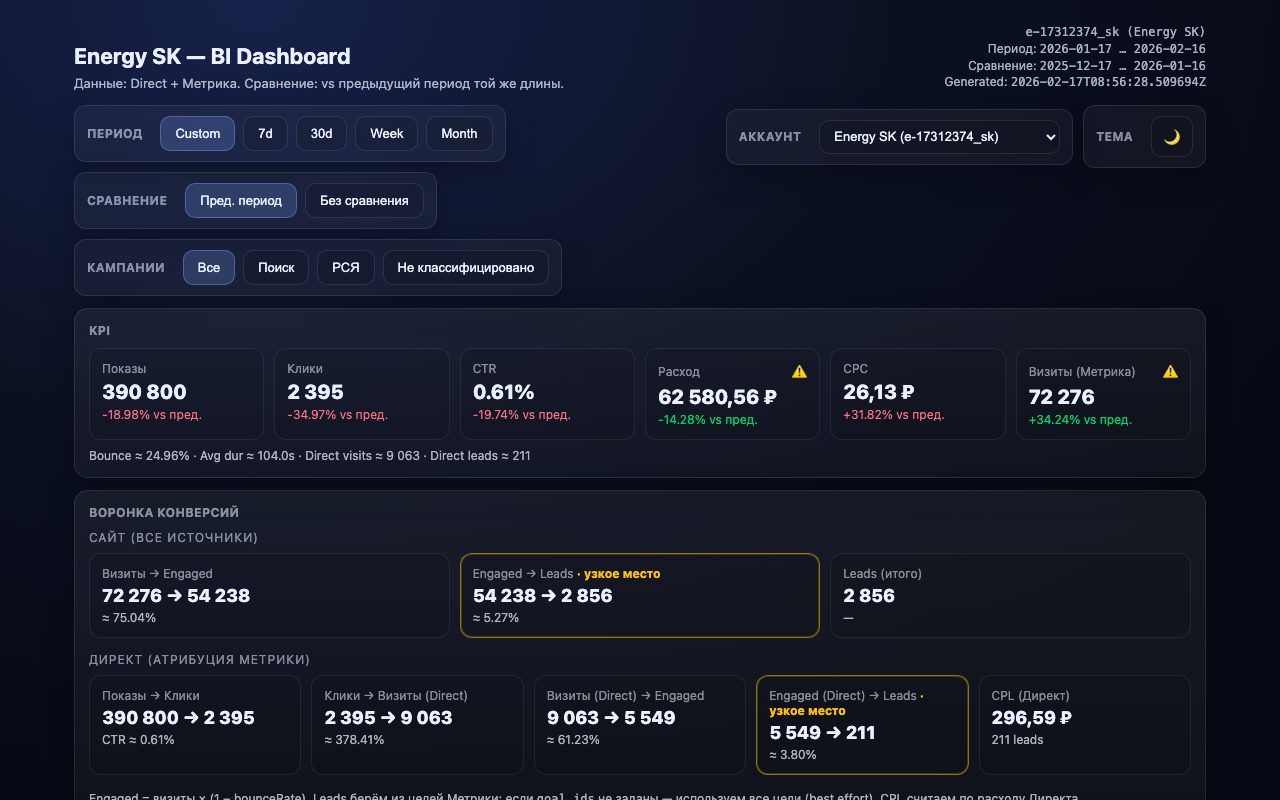
One tool call → a self-contained HTML + JSON dashboard, including multi-account mode.
BI Option 2 · PRO
Everything in Public, plus:
NDJSON-friendly datasets + incremental cursor sync for warehouses, BI, and reproducible pipelines.
- Delivered as a private PRO plug-in
dashboard.schema+dashboard.dataset.*dashboard.sync.start/dashboard.sync.next- Chunking + per-day limits for heavy datasets
B2B Marketing Workflow
The primary production use of this MCP today is straightforward: it is the Yandex data interface for Dream Team B2B / B2B Marketing.
Architecture
Operator
  ↓
Claude Code (Dream Team / B2B Marketing)
  ↓ reads via
yandex-direct-metrica-mcp
  ↓
Yandex Direct + Metrica + Wordstat + Audience
  ↓
dashboard artifacts + analyses + recommendations
Its main job is to expose Yandex data and controlled operations to the marketing system.
In Dream Team, skills compose on top of this MCP:
/offerings-mapper → /gap-overlay + /campaign-audit
→ /synthesis-backlog → /b2b-review → /preflight-qa.
This MCP owns
direct.*,metrica.*,wordstat.*,audience.*direct.hf.*,join.hf.*,wordstat.hf.*,audience.hf.*dashboard.generate_option1for HTML + JSON dashboards- PRO:
dashboard.dataset.*,dashboard.sync.*, guarded writes
B2B Marketing owns
/analyst-weekly,/gap-overlay,/campaign-audit/offerings-mapper,/synthesis-backlog,/b2b-review/pipelineorchestrates the autonomous B2B loop end-to-end- Current production shape: 7 agent roles, 18 skills, 4 B2B projects
Demo
Use these pages to show stakeholders what the outputs look like without any credentials.
Live dashboard (real data)
One tool call → a self-contained interactive HTML dashboard with KPIs, funnel, alerts, and campaign-level analysis.
Install (Claude Code + Docker)
Public is read-only and safe-by-default. PRO is a separate artifact and is expected to be distributed privately to subscribers.
Automated setup
Run the interactive wizard — it creates .env, accounts.json,
and registers the MCP server for your client
(Claude Code, Claude Desktop, Cursor, Codex CLI, OpenCode, Gemini CLI):
python3 scripts/setup.pyPure Python 3.10+, no dependencies. Or follow the manual steps below.
Public (read-only)
Recommended:
claude mcp add yandex-direct-metrica-mcp -- \
  docker run --rm -i \
    --env-file /path/to/your/.env \
    -e MCP_ACCOUNTS_FILE=/data/accounts.json \
    -v /path/to/your/state:/data \
    ghcr.io/<owner>/yandex-direct-metrica-mcp:latest
Tip: set date_to to yesterday (today is often incomplete).
PRO (separate artifact)
Keep the package private (paid subscribers):
claude mcp add yandex-direct-metrica-mcp-pro -- \
  docker run --rm -i \
    --env-file /path/to/your/.env \
    -e MCP_ACCOUNTS_FILE=/data/accounts.json \
    -v /path/to/your/state:/data \
    ghcr.io/<owner>/yandex-direct-metrica-mcp-pro:latest
PRO writes still require explicit env guardrails: MCP_WRITE_ENABLED, HF_WRITE_ENABLED, sandbox-only policy, and (optionally) two-phase confirm.
PRO: BI + controlled changes
PRO is meant for teams who want reproducible analytics pipelines and safe operational workflows: plan changes, review, apply under explicit flags, and keep an audit trail.
Guardrails (writes)
- Public edition forces read-only even if env is misconfigured
- Writes require explicit enable flags
- Sandbox-only writes are recommended by default
- Optional two-phase confirm (
write.confirm)
Design goal: make accidental writes materially harder while keeping ops workflows practical.
What you can sell to clients
- Scheduled dashboards + lightweight alerts (skills)
- BI sync into your warehouse (NDJSON cursor)
- Campaign launch playbooks: diagnose → plan → apply → measure
- Artifacts: evidence, deltas, decisions
To request PRO access, open an issue or contact via GitHub.